All products
Instrument plugin · Windows and macOS

Perigee

One sub. Four modes.

Perigee plays one note at a time, the newest you hold, and sounds the same on both sides, so the sub sits in the middle. Choose Pure for a clean sine, or Thick, Juicy or Rich to add harmonics that carry on laptops and phones. Character sets how many; on high notes they fade above about 1 kHz, so a sub stays a sub. Play legato and Perigee glides from note to note without starting again.

  • Four modes: Pure (a clean sine), Thick (the octave above), Juicy (odd harmonics), Rich (a full row of harmonics)
  • Character sets how much of the mode’s harmonics to add; the sine underneath never changes
  • One note at a time, the newest you hold; legato notes glide (Glide, up to 1 s) and never start again
  • Octave (-2 to +2), Attack (1 ms to 2 s), Release (5 ms to 4 s) and Level (-36 to 0 dB)
  • The same on both sides, so the sub sits in the middle; velocity doesn’t change the level
  • The pitch wheel bends up to two semitones; the sustain pedal holds the note
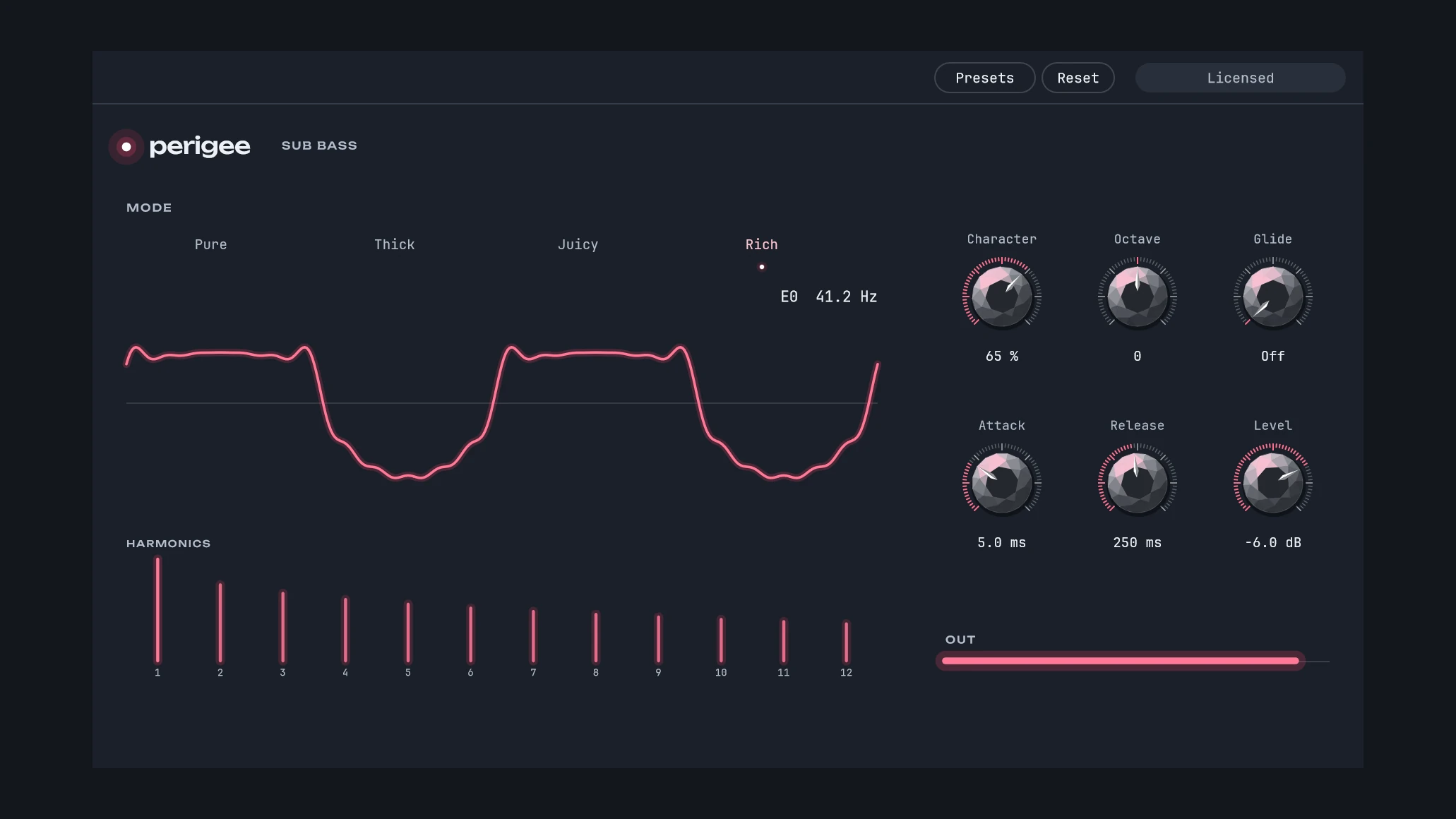
  • The window shows the wave as it plays, its harmonics, and the note with its frequency
  • Your own presets, there in every project, and Reset; your DAW automates every control and your project keeps them
The Perigee window: the four modes, the wave as it plays with its harmonics under it, and the knobs for Character, Octave, Glide, Attack, Release and Level

Perigee from Blazar Core, in your DAW

Blazar Core, Alex’s DAW, has Perigee as one of its own instruments. This is the same Perigee, with the same code, so it sounds exactly the same.

The name: the perigee is the lowest point of an orbit.

A sub bass for under the low strings, the low brass or a synth. Pick a mode for how much it carries on small speakers; the sine underneath stays the same, so the sub weighs the same in every mode.

See what else is in Blazar Core

Before you buy

What you need
A DAW that hosts VST3 instruments, on Windows or the Mac, or Audio Units on the Mac.
Not supported yet
Pro Tools (AAX) and CLAP.
Presets
Presets, at the top of the window, saves your settings as presets of your own, there in every project (in Documents/Alex Pfeffer/Plugin Presets/Perigee). Reset sets every control back where it starts.
The license key
Perigee opens on its key panel until you enter the key from your receipt: paste it, or drop the key file onto the window. Until then, your project and every setting stay as they are, and Perigee is silent. The key is checked on your computer; nothing is sent online.

Specifications

PlatformWindows 10 or later, 64-bit; macOS 12 or later, Apple Silicon and Intel
FormatsVST3 on Windows and the Mac; Audio Unit on the Mac
Version1.0.1
VoicesOne, the newest note you hold
OutputStereo, the same on both sides
LatencyNone
Not supported yetPro Tools (AAX), CLAP
LicenseOne key for Windows and the Mac, checked on your computer