Lost Remnants
Loops. One-shots.
Fragments to build on.
345 original WAVs across six playable programs. Explore loops, long one-shots and chopped fragments in TYDE or your own sampler.
- Format
- WAV + TYDE
- Download
- 449.7 MB ZIP
- Library version
- 1.0.1
- Installation guide
- Included
Audio demos
1 trackLost Remnants
Lost Remnants
Six programs.
All 345 sounds.
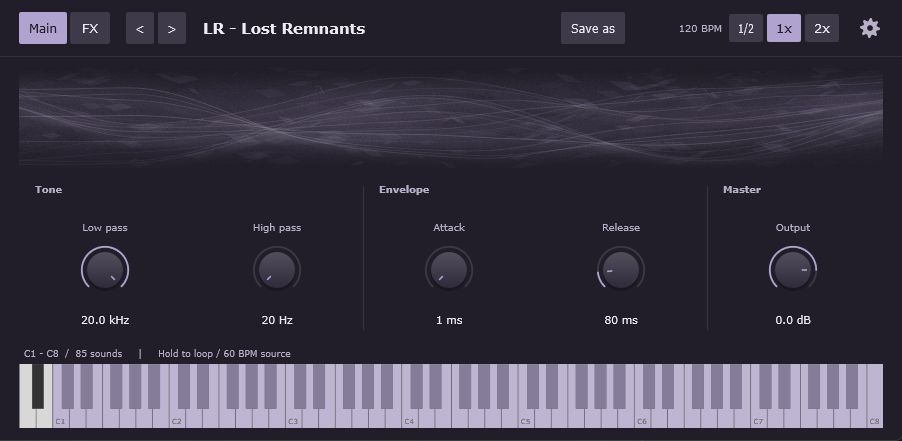
Hold a key in Lost Remnants or Forgotten Signals to loop; release to stop. Tap a key in the Relics or Digital Traces programs to play the complete sound once. Layer keys to combine different sounds.
All six programs follow your DAW’s tempo from 60 BPM, 4/4 source material. Lost Remnants loops for one bar and Forgotten Signals for two. The Relics play for three bars; Digital Traces contains quarter-note fragments.
| Program | Sounds | Keys |
|---|---|---|
| Lost Remnants | 85 | C1–C8 |
| Lost Relics | 85 | C1–C8 |
| Forgotten Signals | 20 | C2–G3 |
| Forgotten Relics | 20 | C2–G3 |
| Digital Traces 01 | 72 | C2–B7 |
| Digital Traces 02 | 63 | C2–D7 |
Lost Remnants and Lost Relics start at C1 (MIDI 24); the other programs start at C2 (MIDI 36). Digital Traces is split into samples 1–72 and 73–135. A full keyboard map is included.
Your sampler. Your workflow.
Play it in TYDE
The six programs use TYDE on Windows 10 / 11 (64-bit) or macOS. Extract the complete Lost Remnants folder beside your other libraries, then click Refresh in TYDE. For a new location, choose the parent folder in Settings. Download the free sampler separately.
Get the free TYDE samplerUse the WAVs directly
All 345 original WAVs are included unchanged: stereo, 24-bit, 44.1 kHz. Use them in any compatible DAW or sampler, on any platform. The source material is 60 BPM in 4/4.
Playback and tempo details
Each key triggers a different sample at its original pitch. All programs follow the host tempo, including the one-shots; use the half-speed, normal and double-speed controls for additional changes. Place trigger notes on your DAW grid for aligned starts; TYDE does not automatically quantize them. The movable effects begin bypassed, with the final limiter enabled.
Ready for commercial projects.
Use the sounds in your personal and commercial music. Sample redistribution and resale are prohibited. Read the license.